Advanced Tools Tab
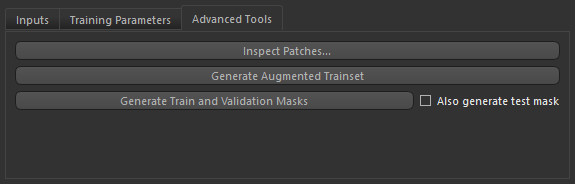
The Advanced Tools tab includes tools to inspect patches, generate augmented training sets, as well as to generate train, validation, and test masks.
Click the Advanced Tools tab on the Model Training panel to go to the Advanced Tools tab, shown below.
Advanced Tools tab
 Inspecting Patches
Patch size can be a critical factor when training deep models for semantic segmentation and must be selected in consideration of the specific characteristics of the input data and the selected model architecture. Generally, patch sizes should strike a balance between computational efficiency, contextual information, and performance for the specific semantic segmentation task at hand.
Click the Inspect Patches button to review patches. Patches will be extracted based on the current patch size, data augmentation settings, and the selected input count and dimension. In the Patches Review dialog, you can review training and validation patches, visually inspect each patch, and extract additional information about all patches.
Patches Review dialog

Generating Augmented Training Sets
In some cases, you may want to generate an augmented training set to improve training speed. Augmented training sets, which include training and validation sets, are generated based on the current patch size, data augmentation settings, and the selected input count and dimension.
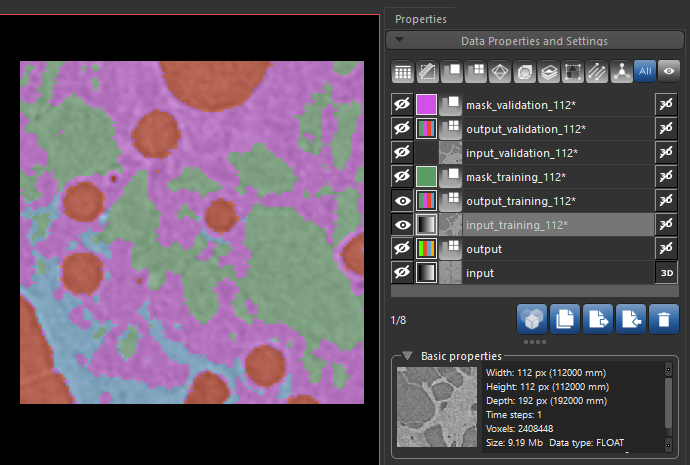
To generate an augmented training set, click the Generate Augmented Trainset button on the Advanced Tools tab on the Model Training panel. Training and validation sets, as well as masks, are added to the Data Properties and Settings panel as shown in the following screenshot.
Extracted augmented training set
Generating Train and Validation Masks
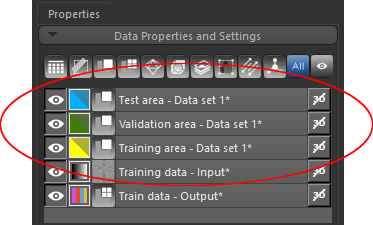
This option lets you generate training and validation masks, as well as masks for test, for each of your training sets. The resulting regions of interest are added to the Data Properties and Settings panel, as shown below.
Generated training, validation, and test masks
You can select the generated masks on the Inputs tab, as shown below.
Inputs tab

